Slime Chunk Finder1.3.1
Publisher Description
Have you spent hours, searching for those elusive slimes, yet have come up empty handed? Are you sick and tired of roaming the land of Minecraftia in search of that precious slimy resource?
Are you ready to stand up, and take matters into your own hands!? Are you ready to finally gain the upper hand in this great injustice and take control of your game like never before!?
======What it does======
Simply, it shows you where to find Slimes in the game 'Minecraft' (http://minecraft.net/).
======How it works======
It uses the same algorithm as Minecraft to determine which chunks are viable for slimes to spawn in. Then it just displays that information in a meaningful way.
This should work for Xbox, Playstation and most PC versions.
======How to use it======
Firstly,load up your Minecraft world.
Next, press 'T' on your keyboard, and type in '/seed' (don't include the quotation marks). If done correctly, and you've enabled cheats in your world, it should spit out a big long number. Yay!
Now ,open up the app, and type the big long number (your seed) into the top text field (next to 'Seed:', funnily enough).
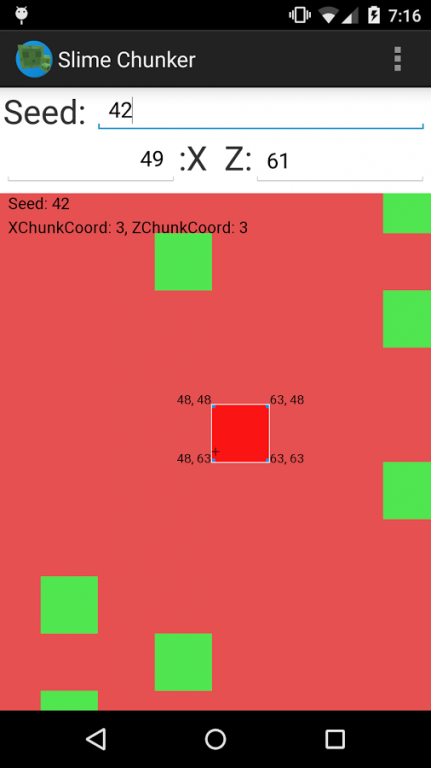
Watch the magic happen, as the display shifts and morphs, until it eventually settles showing a green and red representation of your world.
One last step. In your Minecraft world, press 'F3' on your keyboard. And look for two numbers: Your X coordinate, and your Z coordinate. Enter these two numbers into the respective X and Z number fields. (Just round them to the nearest whole number)
And BAM.
The view is currently centred on your position in Minecraft.
Zoom in and out with two fingers to view more and less of the world.
Green squares represent chunks where Slimes can spawn.
Red squares represent chunks where Slimes can't spawn (unless if it's a swamp Biome)
If you're building a slime farm, just look for a big cluster of green squares nearby.
If you just want to find a slime to make it your pet, then just find your closest green chunk.
When centred on the chunk you wish to use. Zoom in.
The blue squares/blocks in the corners have their coordinates labelled.
In your actual Minecraft game, use the labelled corners to map out the size of the chunk. Then dig down to level 40 (as Slimes only spawn below level 40, when your Y coordinate is less than 40) and dig out a big room within the confines of the square you marked out.
Move away, wait a few moments, and check back to see if Slimes have spawned.
Eventually they should. And hoorah! If they have, congratulations.
If not, double check your seed, ensure you're below level 40. Ensure you're within the green square, and that there is enough room for them to spawn.
About Slime Chunk Finder
The company that develops Slime Chunk Finder is Jamezo97. The latest version released by its developer is 1.3.1. This app was rated by 8 users of our site and has an average rating of 3.5.
To install Slime Chunk Finder on your Android device, just click the green Continue To App button above to start the installation process. The app is listed on our website since 2015-11-01 and was downloaded 464 times. We have already checked if the download link is safe, however for your own protection we recommend that you scan the downloaded app with your antivirus. Your antivirus may detect the Slime Chunk Finder as malware as malware if the download link to net.jamezo97.slimechunker is broken.
How to install Slime Chunk Finder on your Android device:
- Click on the Continue To App button on our website. This will redirect you to Google Play.
- Once the Slime Chunk Finder is shown in the Google Play listing of your Android device, you can start its download and installation. Tap on the Install button located below the search bar and to the right of the app icon.
- A pop-up window with the permissions required by Slime Chunk Finder will be shown. Click on Accept to continue the process.
- Slime Chunk Finder will be downloaded onto your device, displaying a progress. Once the download completes, the installation will start and you'll get a notification after the installation is finished.
Program Details
System requirements
Download information
Pricing
Version History
version 1.3.1
posted on 2015-11-01
1.2)
Rotating the phone no longer resets the app. Added a splash screen and a not-so-hidden-at-all Easter-egg on the splash screen, because why not.
Cursor now centres on the middle of the block instead of the top-left corner.
1.3)
Added:
PC to Android network communication mod, Optimized rendering, New logo, Changed splash screen, Smoother movement and Grid functionality.
1.3.1)
Fixed 'Get Mod' button.
